


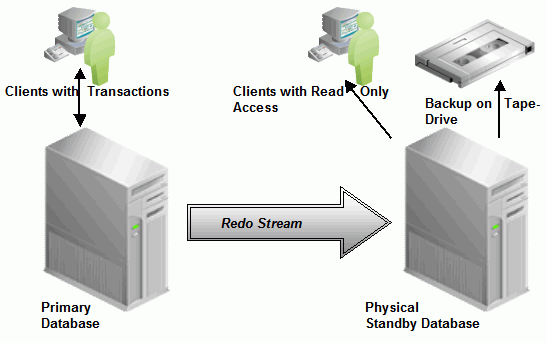
I got ” MRP0: Background Media Recovery terminated with error 1274 after adding a Datafile ” error in Oracle dataguard ( Standby Site ).
MRP0: Background Media Recovery terminated with error 1274
Details of error are as follows.
File #692 added to control file as 'UNNAMED00692' because
the parameter STANDBY_FILE_MANAGEMENT is set to MANUAL
The file should be manually created to continue.
Errors with log +ARCH_MSDB/MSDBDR/ARCHIVELOG/2020_12_02/thread_4_seq_336447.1795.1058125471
PR00 (PID:94177): MRP0: Background Media Recovery terminated with error 1274
2020-12-06T09:57:00.113322+03:00
Errors in file /u01/app/oracle/diag/rdbms/MSDBdr/MSDBDR1/trace/MSDBDR1_pr00_94177.trc:
ORA-01274: cannot add data file that was originally created as '+DATA/MSDB/DATAFILE/bigdatatbs.184399.1058113529'
2020-12-06T09:57:01.755485+03:00
Recovery interrupted!
2020-12-06T09:58:53.698469+03:00
rfs (PID:322307): Archived Log entry 4725 added for B-977575671.T-8.S-359459 ID 0x7a7af737 LAD:2
ORA-01274: cannot add data file
The ORA-01274 error is related with the new added datafile to the Production and standby_file_management parameter is set to MANUAL in standby database.
This Error occurs if we add a Datafile OR Tablespace in PRIMARY Database and that could not be translated to the Standby Database due to these Reasons:
- Standby_file_management is set to MANUAL
- Primary & Physical Standby are having different file structures and DB_FILE_NAME_CONVERT is not set according to the Directory Structures in Primary and Standby
- Insufficient Space or wrong Permissions on the Standby Database to create the Datafile
- If standby_file_management is set to Auto ,but directory path of Primary and standby are different , db_file_name_convert is not set ,but db_create_file_dest has been set to wrong value on standby.
The Redo Log generated from Primary will have Information about the Tablespace / Datafile added however it could not be created successfully in Physical Standby Database due to the standby_file_management = MANUAL
or is not able to find the specified Folder due to a missing / incorrect Filename Conversion.
The File Entry is added to Standby Controlfile as “UNNAMED0000n” in /dbs or /database
folder depends on the Operating System and eventually the MRP terminates.
SQL> show parameter standby_file

NAME TYPE VALUE
------------------------------------ ----------- ------------------------------
standby_file_management string MANUAL
SQL>
To solve this error, Find the unnamed file in Standby. You can find out This unnamed filename both in alertlog and with the following script.
SQL> select file#,name from v$datafile where name like '%UNNAMED%';

/u01/app/oracle/product/19.0.0.0/dbhome_1/dbs/UNNAMED00692
Now create it again as follows, it will solve this error.
SQL> alter database create datafile '/u01/app/oracle/product/19.0.0.0/dbhome_1/dbs/UNNAMED00692' as '+DATAC1';

Database altered.

SQL>
And set the standby_file_management to the auto as follows.
SQL>alter database set standby_file_management = 'auto' scope=both sid='*';
Now Start the MRP Process and start dataguard again as follows.
SQL> ALTER DATABASE RECOVER MANAGED STANDBY DATABASE DISCONNECT FROM SESSION;

Database altered.

SQL>
You can read the following post to see dataguard related errors.
If you want to learn how to install Dataguard ( Standby ), read the following post.
Oracle DataGuard Physical Standby Installation Step by Step Using RMAN -1
Do you want to learn Oracle Database for Beginners, then Click and read the following articles.
Oracle Database Tutorials for Beginners ( Junior Oracle DBA )