

If the error 926 occurs while working with SQL Server? Can not access data from the SQL database? If so, then your request will be resolved here. This blog will show you how how to deal with the Microsoft SQL Server error 926 with the best possible solutions. So read on to find a suitable solution.
Error 926:- Database ‘msdb’ cannot be opened. It has been marked SUSPECT by recovery. See the SQL Server errorlog for more information. (Microsoft SQL Server, Error: 926).


This error message appears on the user screen when the database marked as suspect due to failed recovery process. When the user attempts to connect SQL instance using sysadmin login and SSMS, the SQL server throws 926 error. This error code causes trouble in SQL Transactions and can affect the proper functioning of SQL Server. It makes the database inaccessible to users.
Reasons Behind SQL Server Error 926 MSDB
There are many reasons and scenarios from which this SQL error code 926 appears. Here are some reasons-
- The SQL database may have been marked as suspicious
- Malware errors in the hardware of the computer
- Due to corruption in the header part of the system file
- Abrupt shutdown of the SQL Server application
- When the SQL Server user appends a database
- When restoring the database in SQL Server
- Extract transactions from the database log
What to Do to Fix Microsoft SQL Server Error 926?
There are several fixes to sort out the SQL 926 error code. You can follow the below-mentioned solutions:
- Restart the connection
- Disconnect and Reconnect the connection
- Restart the service SQL Server
- Restart SQL Server Management Studio (SSMS)
- Restart your computer
If these basic solutions do not work well to fix SQL Server 2008 error 926 MSDB, you must opt for an alternate solution.
100% Working Solution to Fix SQL Error Code 926
You can use the SQL Server Database Recovery software, which is the best and most secure solution to resolve the Microsoft SQL Server error 926. This tool can repair SQL Server corruption and fix all errors effectively. It helps the user to recover corrupt SQL database file MDF and NDF with all objects like tables, views, stored procedures, triggers, etc. In addition, you can easily restore SQL Database to a new database or an existing database. It offers multiple features that allow users to easily accomplish this task. Here are some highlighted features:
- Recover SQL Server database with all objects
- Useful for novice users (non-professional)
- Supports all SQL Server versions including SQL 2019
- Recover MDF and NDF without size limitations
- Restore SQL Database to new database
- Option to recover deleted records in SQL Server from the table
- No virus or malware attack issues
- 24*7 customer support available
Steps to Troubleshoot Microsoft SQL Server Error 926
Follow the below step-by-step process to fix SQL error code 926 in just a few mouse clicks:
Step 1. Download and run the SQL Database Recovery software on your machine


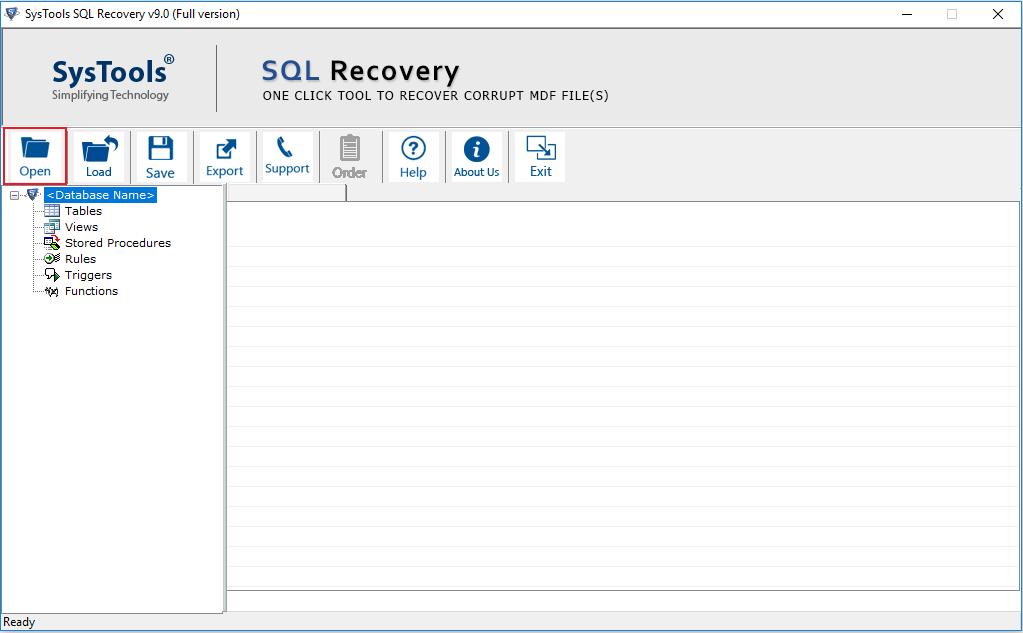
Step 2. Click Open to load the database file

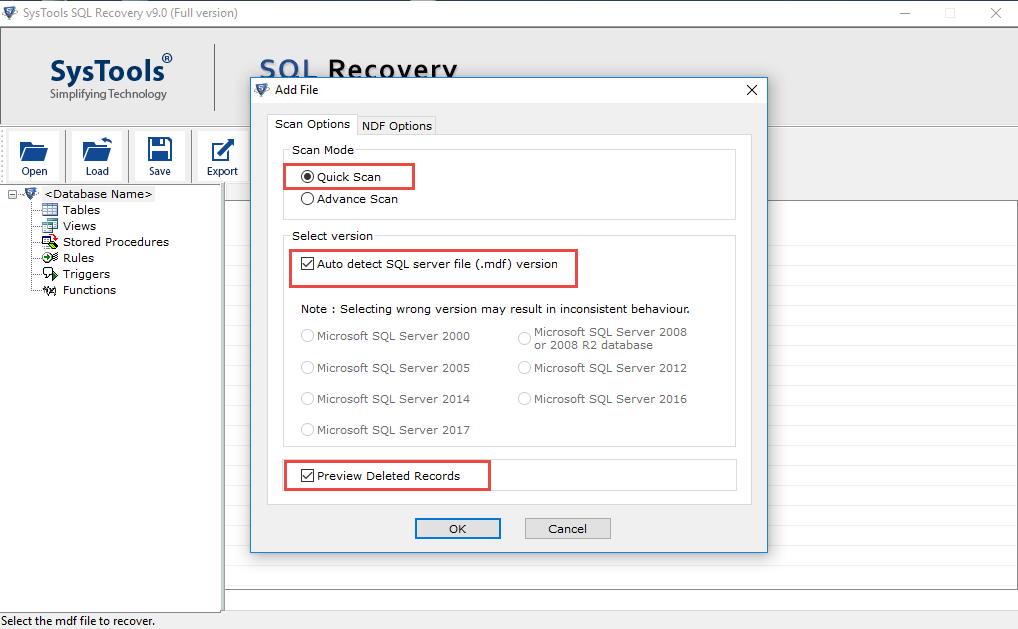
Step 3. Select Quick or Advanced scan option and also check SQL Server MDF file version

Step 4. Now, the scanning process will start, once it is don you can see the preview of all recovered database items


Step 5. Click the Export button and select Export data to SQL Server database or SQL Compatible Scripts


Step 6. Restore SQL database to a new database or an existing database as per the need

Step 7. Restore data With Only Schema or Schema & data both. Click Export to finalize the process.

The Final Words
If you do not want to get stuck in trouble due to the SQL error code 926, then using SQL MDF File Recovery is always the best solution. As SQL Server plays a crucial role when it comes to the management of the business database, the corruption or loss of individual information can affect the SQL Server database. To resolve all these problems, use the professional solution and fix Microsoft SQL Server error 926 within a few minutes.
Do you want to learn Microsoft SQL Server DBA Tutorials for Beginners, then read the following articles.
https://ittutorial.org/sql-server-tutorials-microsoft-database-for-beginners/